

Spanner Sign after Battery Change

I’ve had this watch since 2007, and it’s been with me through countless dives as well as everyday use at work. That’s what makes it special — it’s a proper dive watch, yet refined enough to wear in a professional setting without looking out of place.
I remember once getting the battery changed in Canada. When I went back to pick it up, the sales lady was quite amused to see my dive log stored in the watch, mentioning that it’s rare to come across someone who actually uses it for diving—most people just wear it for the look. However, the technician seemed a bit concerned. When I asked what was wrong, he pointed to a small spanner icon on the display, saying he couldn’t get it to go away. I smiled and told him it’s one of those “looks alarming, fixes easily” situations.
That little spanner icon (see the image below, circled in red) is actually quite common after a battery change — and the good news is, it’s easy to reset once you know how.
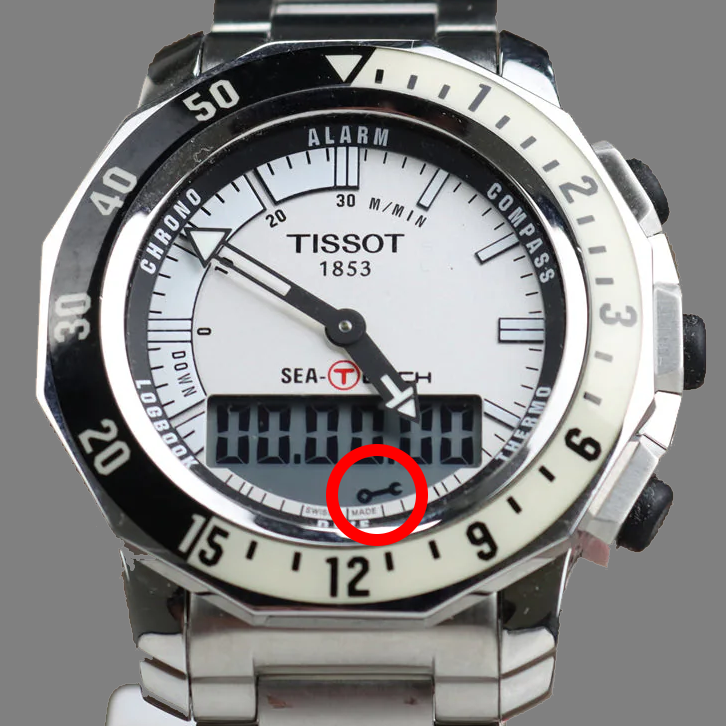
To remove the spanner icon, follow these steps:
1. Enter sleep mode
- Activate the touch screen, then repeatedly tap the centre of the screen until *OPT* appears.
- Press the middle button (3 o’clock position) once — the display will show 12h or 24h.
- Tap the centre of the screen twice to display SLEEP.
- Wait a few seconds — the screen will go blank and both hands will move to the 12 o’clock position.
2. Access the reset function
- While in sleep mode, press and hold the 2 o’clock button for 6 seconds, then touch the 6 o’clock (Dive) position on the watch face.
3. Confirm code display
- The digital display should show a code (e.g., 06G315).
- If it doesn’t, repeat Step 2.
4. Cycle through codes
- Use the 2 o’clock button to scroll through all message codes until you return to the first one.
5. Exit sleep mode
- Press the 3 o’clock button to exit sleep mode.
The spanner icon will now disappear from the display.

💬 Comments
Please Login to Comment!